
Article on:
Profile Related FAQs
How can I edit my billing address on Beat22?
Need to update your billing address for invoices or purchases? On Beat22, you can easily delete and add a new one.
Here’s how:
Step-by-Step: Update Your Billing Address
- Log in to Your Account
Go to beat22.com and sign in with your buyer account. - Click on Your Profile Icon (Top Right Corner)
Once logged in, click your profile icon at the top-right of the page.

- Go to “Settings”
From the dropdown menu, select “Settings” to open your account settings.
- Find the “Billing Address” Section
Scroll to the Billing Address area.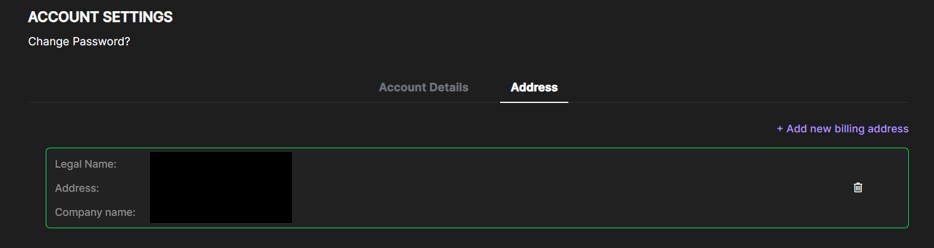
- Click the Trash Icon 🗑️
To remove your existing address, click the dustbin icon next to it. - Add a New Billing Address
You can keep the previous billing address and add a new billing address as well. Click “Add Address” and enter your new billing details. - Save Changes
Once entered, click Save to update.
Why This Matters:
- Keeps your invoices accurate
- Ensures smooth payment processing
- Helps with tax and legal compliance
If you face any trouble updating your billing details, email us at support@beat22.com — we’ll help you out quickly!
(DISCLAIMER: Beat22 does not legally represent any producers, sellers, and artists via this Platform. Beat22 is only recommending license terms as per universally acceptable industry practices. You are advised to consult with independent legal counsel before licensing any music and/or entering any transaction via Beat22 Platform.)


